Category: Computing

Syntax diagrams (by )

I've always liked syntax diagrams as a way of describing languages. They make it clear what options are legal in any given situation.

However, drawing them by hand is tedious, so after a moment's thought, I realised it would be pretty trivial to design a reasonable layout algorithm to generate them automatically.

And so, on a train journey, banterpixra was born!

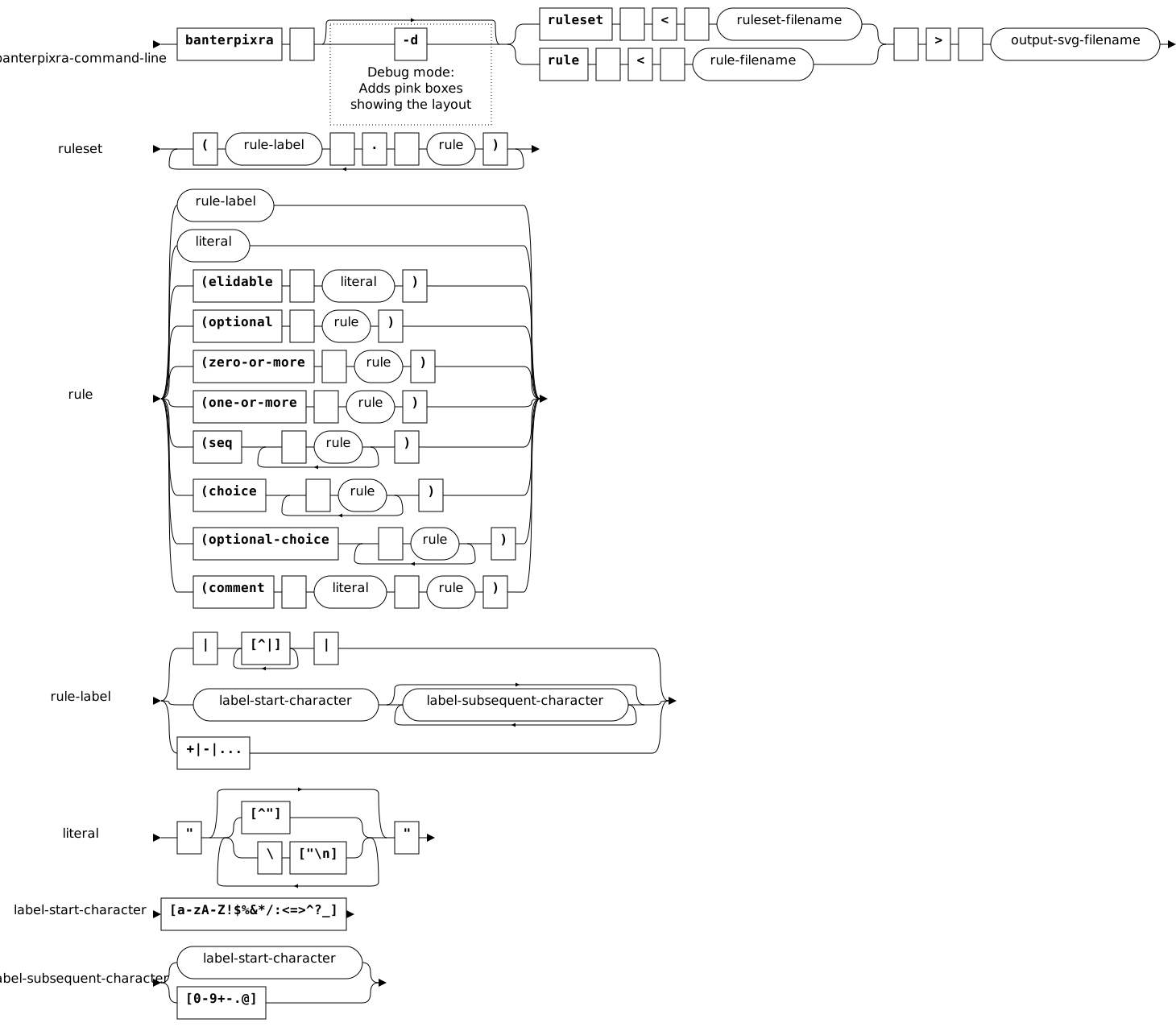
It's quite simple. It takes a BNF-esque grammer, encoded in s-expressions like so:

(rule
 . (choice
    rule-label
    literal
    (seq "(elidable" " " literal ")")
    (seq "(optional" " " rule ")")
    (seq "(zero-or-more" " " rule ")")
    (seq "(one-or-more" " " rule ")")
    (seq "(seq" (one-or-more (seq " " rule)) ")")
    (seq "(choice" (one-or-more (seq " " rule)) ")")
    (seq "(optional-choice" (one-or-more (seq " " rule)) ")")
    (seq "(comment" " " literal " " rule ")")))

...and it turns it into a nice syntax diagram, rendered as an SVG file. I found producing an SVG to be a very easy way of generating vector images - SVG is quite a decent format to generate, and inkscape will happily convert .svg files to .png and .pdf from the command line, so it's easy to automate rendering.

The layout algorithm is quite easy. The BNF is parsed, and a tree of layout objects generated from the bottom up. Layout objects may contain other layout objects, recursively, and cover a rectangular extent of the two-dimensional plane. New layout objects are created at the origin, and then the parent layout looks at the sizes of the child layouts within it, and relocates them to appropriate locations within itself. When the layout object tree has been generated, it's processed top-down to generate actual SVG. Each different type of layout object renders its children recursively (unless it's a terminal, in which case it just renders itself at the chosen location), then it adds the arrows and lines that join the children together.

That's really all there is to it.

The output is quite decent, if your browser supports SVG!

User Interfaces for Event Streams (by )

Reading Phil Gyford's post about the reasoning behind his Todays Guardian app reminded me of an old interest of mine - the design of user interfaces that show people streams of events.

I hate the fact that I have several systems that have reason to throw notifications at me:

  1. Incoming email (with multiple accounts)
  2. Twitter (with multiple accounts)
  3. RSS feeds I follow
  4. Voicemails/SMSes
  5. Notification of server failures and other such technical problems
  6. Incomng phonecalls, Skype calls, etc
  7. IMs and DMs in IRC, and people mentioning my name in IRC channels
  8. People talking in channels I'm following in IRC
  9. Scheduled alarms (time to stop working and eat!)
  10. Batch processes have finished (I often start a long compilation/test sequence going then browse the Web for five minutes while it runs - then get distracted and come back twenty minutes later)

Many of these event sources are capable of producing events of different levels of urgency, too. It's really quite complex. Some things shout in my face (incoming skype messages cause a huge window to pop up over what I'm doing, for example) while some need to be manually checked (such as email; I get too much spam for the "you've got mail!" noise to mean much to me), and this has little correlation with the relative importance of them.

Obviously, the first thing to do is to have some standard mechanism in the user interface system for notifying me of events. Growl is a start, but it's focussed on immediate notifications, rather than handling a large backlog of events. What I want is something like my email inbox, that has a searchable, scrollable, history, and notifies me when new events come up. But I also want richer metadata than Growl has; I want all IMs, emails, and whatnot from the same person to be tied to that 'source' of events, so I can filter them into groups. I want to have Personal, Work, and Systems events, and to have Personal deprioritised during working and Work deprioritised during personal time. And so on.

The BlackBerry OS goes someway towards this with its integrated Messages system. Any app can register to put messages into the message stream, so when I get emails, BlackBerry IMs, notifications of new versions of software being available, etc. they all appear in the same time-stream and I get a 'new message' notification. I want something similar on my desktop, but with much more advanced filtering and display capabilities. My design for 'user agent' entities in ARGON involves using a standard "send an object to an entity protocol" for all email/IM/notification activities - the same protocol that is used to send print jobs to a printer, files to a backup system or removal storage device, orders to an automated process, and so on; it's roughly the equivalent of "drag and drop" in a desktop GUI. Incoming objects from 'elsewhere' are then combined inside the UA with internal events such as calendar alarms and situations the user agent might poll for, such as things appearing in RSS feeds, into a centralised event stream, by the simple process of translating all internal events into incoming objects like any other; but actually designing a user interface for displaying that is something I look forward to doing...

Phil's analysis of the newspapers interests me, because it's a very similar challenge. You have a stream of events, and the user may want to skim over them to see what's relevant then zoom into particular ones. How do you present that, and how do you help the user deal with an inundation of events, by applying heuristics to guess the priority of them and suitably de-emphasising or hiding irrelevant events, or making important events intrude on their concentration with an alarm? Priority is mode-dependent, too; if you're in an idle moment, then activity in your interest/fun RSS feeds should push out work stuff entirely - apart from important interruptions. And some events will demand my attention to respond to them, in which case they should offer me links to the tools I need to do that - a notification of a problem on a server, ideally, should carry a nice button that will open me up a terminal window with an ssh connection to that server. But some things might require my attention, but I can't give it yet - so I need to defer the task, so it doesn't then clutter my inbox, yet in such a way that it reappears when all higher-priority tasks are done. There are elements of workflow, where events need an initial "triage" to be categorised into "read-and-understood, do now, do later today, do whenever" and maybe prioritised, then later, deferred tasks need to be revisited.

Also, some event streams are shared. Perhaps an event should be handled by the first member of a team to be free, such as a shared office phone ringing, or a bug to be fixed or feature added to a software product. There needs to be some system for shared event pools, with support for events to be "claimed" from the pool by a person, or put back. Perhaps personal event systems should be able to contain proxy objects that wrap events stored in a shared pool somewhere, so they can be managed centrally as well as appearing in personal event streams along with events from other sources. Standard protocols would be required to manage this.

Looking at the relatively crude support for this kind of thing in even the supposedly integrated and smart combined email/calendar apps, I think there's a lot of fun research to be done!

Ugarit Roadmap (by )

I've not had much time to hack on Ugarit lately, which is a shame - but just to keep you enthusiastic, here's my current roadmap.

Read more »

Debill – A Protest Poem (by )

Debasing
Electronic economy
Being blinded by
Illogical idosyncrasies
Leading literate
Lynchings

BlackBerry (by )

Many moons ago I did some work writing apps for BlackBerries. I liked the things at the time; they seemed to be well-built, both from the hardware and software angles.

So when my mobile phone contract came up for renewal (meaning I can get a free new phone if I sign up for another two years), with my existing phone falling to bits and rather crashy, I was pleased to find that I was eligible for a free BlackBerry 8520!

The device is a nice evolution of the BlackBerry I was using back in 2004 or so; rather than the thumb-activated scroll wheel we now have a two-dimensional scroll thing that works like a trackball, but seems to really be the innards of an optical mouse, set up so it sees my thumb moving over a small plastic window. This works well, takes up little space, and has no moving parts apart from the click action when it's pressed in to select something. The one downside of the new hardware is that my original Blackberry had a reflective LCD; it had an optional backlight, but spent most of its time with it switched off, simply reflecting the light incident upon it (in colour!). This didn't make for vibrant, saturated, hues in photos, but it did save a lot of power, and meant that the screen was highly readable in the brightest sunshine.

There's a few rough edges in the software; my model lacks a GPS, and the supplied maps application lets me enter my home and work locations by typing in an address, then gives me the option to locate that from the current GPS position (which of course fails) or to look up the address - which also fails, claiming the state/province cannot be found. If I just put the postcode into the address and nothing else, it works - but only matches on the first part of my postcode, getting a location that's some distance away in my rural area. I'd like to have an option to choose the location I've scrolled the map to by hand, geocoding that doesn't suck, and no menu options about GPSes when I have no GPS, please.

The mail system tries to auto-configure itself. Which is a blessing, and a curse. I bet it's a blessing for many users, and their IT departments, that they can just enter their email address and password, and have the rest fetched. However, I have a funny mail setup; I have lots of different IMAP mailboxes on the same server, with usernames like "alaric-work". And there happens to be a POP3 daemon listening on the machine that hosts my employer's web site. So when I put in my work email address, it notices that the domain part of the email address has an A record, and it has a POP3 server, and that POP3 server has a user called alaric (which is the user part of my work email address) which it can log in as with that password - so it goes ahead and makes me a POP3 account... with the wrong username and wrong mail server. Which would be OK apart from the fact that there's no way of changing the protocol or username on an existing mail account.

The trick, it turns out, is to deliberately put the wrong password in on the initial setup screen. This causes the POP3 login attempt to fail, and the subsequent IMAP one (in order to be compatible with Outlook's autodetection, it tries POP3 before IMAP!) too; it then says it can't automatically configure me, and asks me to list username and mail server. It then proceeds to guess IMAP somehow (it still didn't ask me, and the machine has POP3 as well as IMAP on it), and pow, my IMAP account is set up.

WordPress Themes

Creative Commons Attribution-NonCommercial-ShareAlike 2.0 UK: England & Wales